![7 Practical ways to better use AI in CRM [ CTO’s guide]](https://feriotti.com/wp-content/uploads/2026/02/1-3-1024x576.png)
As every single platform now has its own AI, CRMs have also caught up by introducing their built-in AI models. And it’s true we don’t use all those AI models. However, your CRM AI can be very beneficial for your business, and if you’re not using it, you’re missing out on efficiency, automation, and time saved.
The question is how to use AI in CRM to actually save time and see efficiency in processes. I’m sharing 7 practical ways you can better utilise your CRM using AI by removing manual admin work, automating workflows, generating emails and follow-ups and identifying patterns.
What can AI in CRM do? Is it actually useful?
Your CRM AI is your personal assistant that learns from every interaction, every email, every click, and then turns that data into actionable intelligence. It can predict which leads are hot, flag at-risk customers, automate tedious tasks, and even suggest next steps.
We are going through all that in detail in the next heading. But the point is, it is actually useful if you know how to use it right.
Also read: How to use CRM in business to grow & win more customers
7 efficient and time-saving ways to use AI in CRM
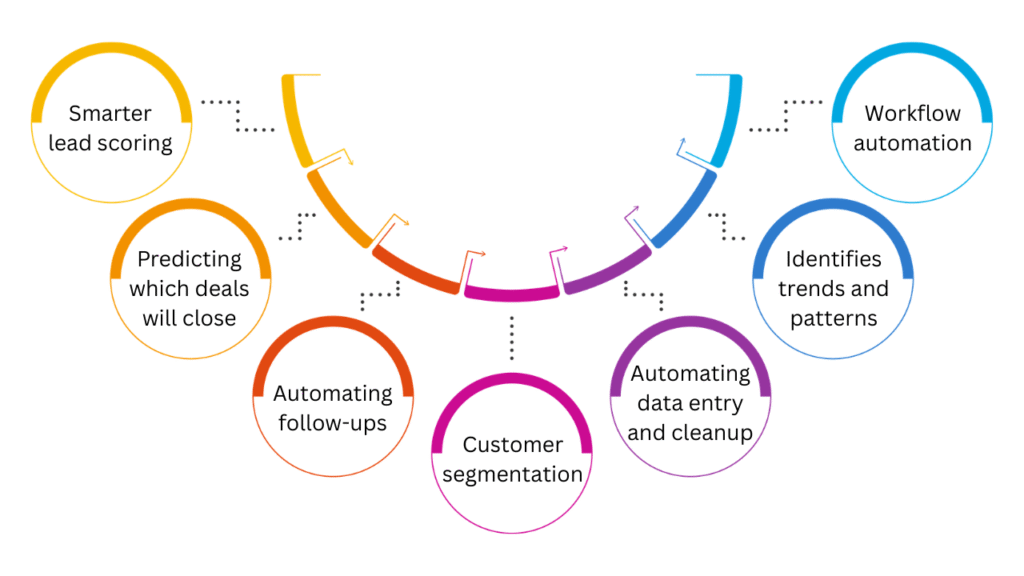
1. Smarter lead scoring
Instead of treating every lead the same and wasting time and resources on every single lead. You can prioritise warm to hot leads.
AI in your CRM analyses behaviour like website visits, email engagement, and past conversions to automatically rank leads by likelihood to buy, depending on where they rank on the scale of cold to warm. You can set the parameters as per your liking.
The result is pure efficiency. Your team can focus on converting warm leads while nurturing the cold ones. They focus only on high-intent prospects instead of chasing everyone. This way, your sales cycles get automated and shorter while systematically nurturing leads, which results in better conversion rates.
2. Predicting which deals will close
The next stage of lead scoring is closing predictions. Your CRM AI can analyse past deal patterns like sales cycle length, engagement level, response time, budget size, and decision-maker involvement to predict which open deals are most likely to close. Again, you can set the parameters of your choice.
This not only helps you prioritise and focus more on the right deals, but you can estimate your revenue, budget and operations accordingly.
3. Automating follow-ups
You can play on different levels with follow-ups. You can either let AI take over and send follow-ups after a defined number of days, or you can let it set reminders or create a task so the team can follow up.
Your CRM AI can also help you draft follow-up messages just like ChatGPT and Gemini. If you choose to let AI handle follow-ups, you don’t have to worry about the tone. Most CRM AIs are smart enough to draft a personalised and professional message. You can also give it a template to fill in and shoot.
4. Customer segmentation
Every business has some sort of customer segmentation. It’s a small but repetitive task to manually make an entry or switch tags for existing customers.
You can automate that with AI. With a single prompt, you can ask AI to categorise your customers into your desired segmentation. It can be based on purchase history, engagement level or lifecycle stage.
This allows you to send targeted offers, relevant content, and timely promotions to the right group of customers. You can expect higher engagement, stronger retention, and more revenue with targeted and personalised marketing.
5. Automating data entry and cleanup
A messy CRM does more harm than good, and data entry and cleanup are a part of maintaining your system. If you leave it that way, the data will be unorganised, incomplete, or even duplicate, which leads to bad results and decisions.
AI can take care of it by auto-filling missing fields, updating contact details based on activity, and removing duplicate entries. It can even standardise formats across your database. You get cleaner data, which leads to accurate numbers and better reporting, all without manual admin work.
6. Identifies trends and patterns
AI can help surface patterns and trends before your team digs into data and spot them.
First of all, it saves time on analysis. Secondly, it informs you early, and some AI models also suggest the next step, making decision-making easy.
You can monitor your desired parameters like declining conversion rates, rising acquisition costs, or top-performing segments.
7. Workflow automation
If you want to automate a series of tasks, you can use workflow automation. However, typical workflow automation in CRM is slightly complex and often requires external tools. You can now use AI to automate workflows within minutes. Think of
- moving deals between stages,
- assigning leads,
- sending follow-ups,
- updating records, and
- reminding the team about deadlines.
Remember, I mentioned giving AI a template for follow-ups; you can do that with workflows.
Example
Here’s a detailed breakdown of a workflow automation in CRM using AI
Scenario: Lead-to-customer automation
Sales reps juggle dozens of leads, often forgetting follow-ups or sending generic messages.
AI automated workflow
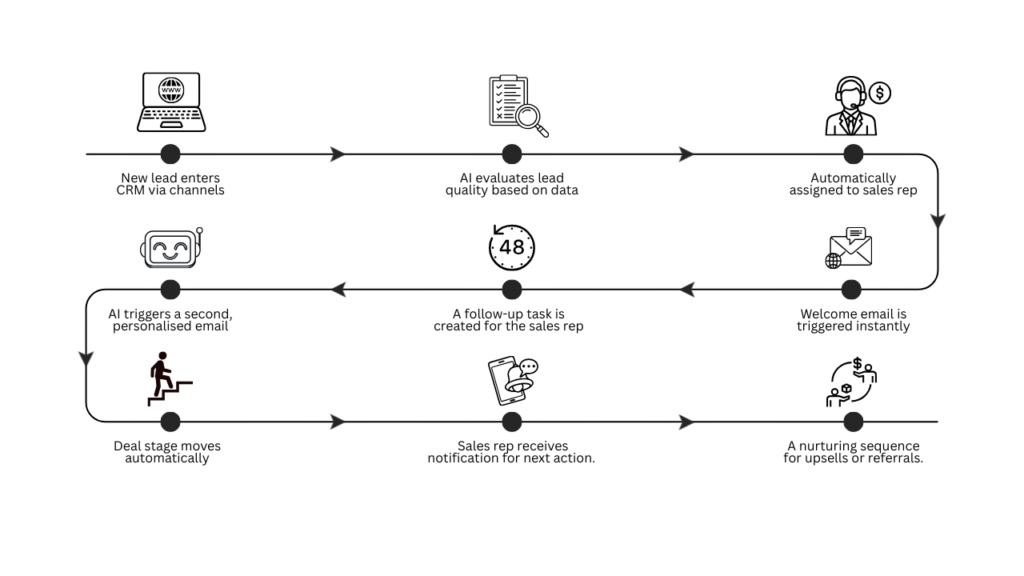
- New lead enters CRM via website form or social media ad.
- AI evaluates lead quality based on data (industry, engagement, past conversions).
- Lead is automatically assigned to the right sales rep.
- The welcome email is triggered instantly to the lead with relevant info or offers.
- A follow-up task is created for the sales rep if the lead doesn’t respond within 48 hours.
- AI monitors engagement: If the lead opens the email but takes no action, AI triggers a second, personalised email.
- Deal stage moves automatically once the lead responds or books a meeting.
- Sales rep receives notification for next action.
- After conversion, CRM automatically adds the customer to a nurturing sequence for upsells or referrals.
You can create this workflow with simple prompts defining your parameters and templates/style for follow-up emails.
There can be multiple other workflows that you can automate. For example,
- New customer onboarding
- Invoice & payment follow-up
- Customer feedback & review request
- Customer support ticket to resolution
- Contract renewal & upsell reminders
- Appointments, bookings and rescheduling updates
Final thoughts
That’s pretty much it from my side, but the possibilities of using AI in CRM are not limited to these 7 ways. Depending on your business requirements, you can do a lot with AI.
Once you start using AI in your CRM, you’ll wonder how you ever survived without it. Think of it like having a super reliable assistant who never sleeps, never forgets, and actually remembers all the tiny details you usually forget—like follow-ups, leads, and who said what last week.
The best part? You don’t need to be a tech wizard to set it up. A few smart prompts, a couple of templates, and boom, you’ve got workflows, automated follow-ups, and clean data in your CRM.

![7 Practical ways to better use AI in CRM [ CTO’s guide]](https://feriotti.com/wp-content/uploads/2026/02/1-3.png)