“Automate your AR.”
“AI will get you paid faster.”
Right, but how exactly? That’s the agenda of this article. We’re going to see what accounts receivable (AR) automation is, how it helps you get paid faster and clears the messy backend your AR team is drowning in. This is a CTO’s (mine) no -jargon, simple explanation so you can connect the AR automation to business outcomes and see its real value.
What is accounts receivable automation?
Accounts receivable (AR) automation means using software and AI to handle the repetitive, manual tasks involved in getting paid without your team doing it the old-school way.
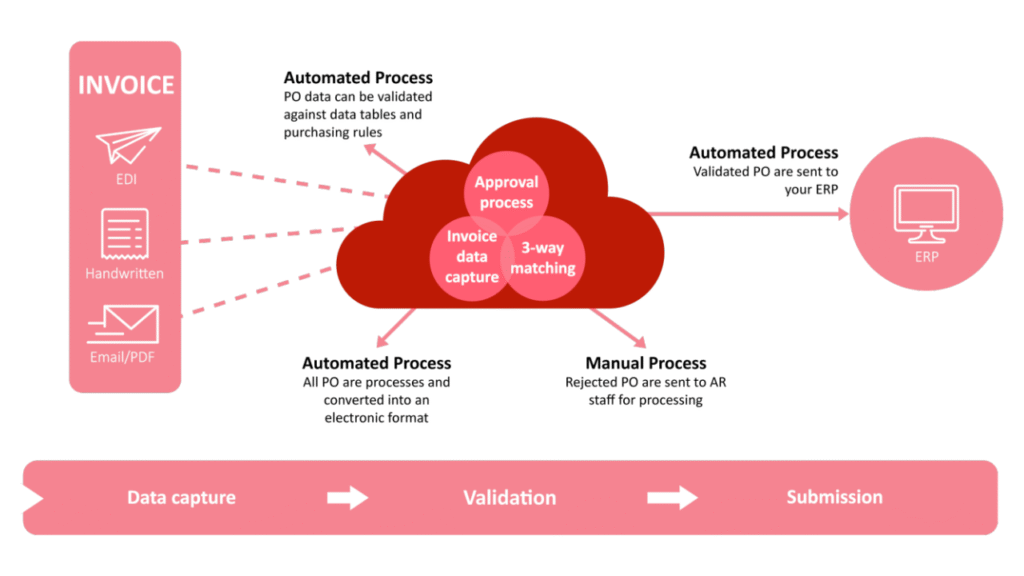
In a manual AR process, your team is copy-pasting data, sending individual follow-up emails, reconciling payments in spreadsheets and whatnot. They are surrounded by numbers and confusion while trying to make it all make sense.
This is an oversimplified AR process.
- You manually create the invoice.
- Fetch the customer’s info from the system and send the invoice.
- Wait to get paid.
- If they pay, success; otherwise, send follow-ups and reminders. Then wait again to be paid. Basically, chase them until you’re paid.
Key steps or components of AR automation
We will break down the whole AR process into simple steps and see how we can automate them.
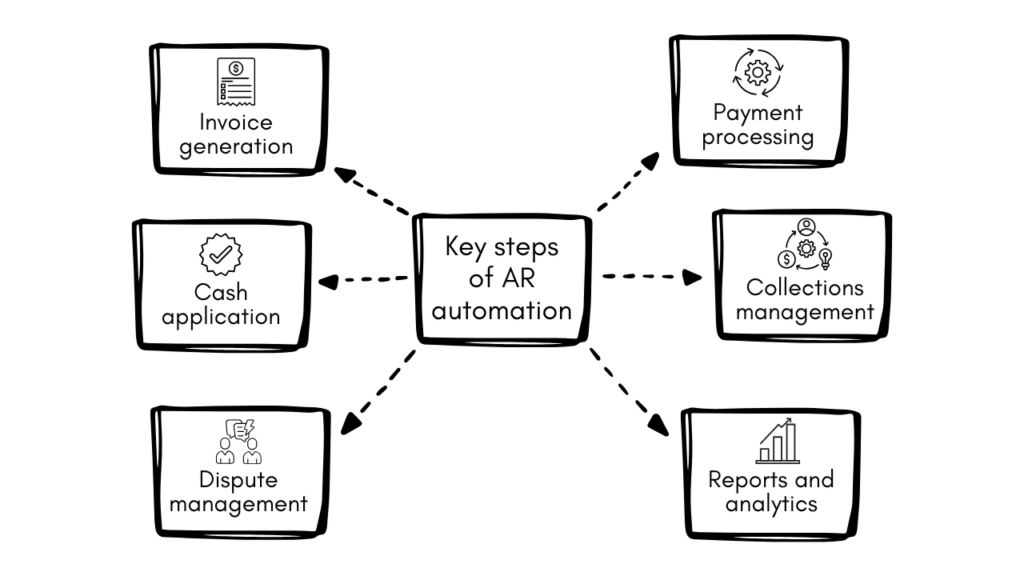
1. Invoice generation
Automated invoicing pulls data directly from your contracts, sales orders, or ERP and generates accurate invoices without human input. It then delivers them through the customer’s preferred channel, for instance, email, portal or EDI.
What this looks like in practice:
- Invoice triggers automatically when a deal closes or a milestone is hit (you define the trigger)
- The system extracts the data from your accounting software or ERP (whatever you’ve integrated) and prepares the invoice by filling in the customer and sales data in a standard template.
- The invoice is sent as per the defined method.
- Customers get a payment link embedded directly in the invoice.
- You can see exactly when the invoice was opened.
Also read: Data entry problems & solution: fix with automation
2. Automatic payment processing
You want to make it as easy as possible for your customers to pay. Automation allows
- 24/7 self-service payment options,
- auto-reconciliation with your ERP or accounting system,
- and automatic receipts and confirmation sent to the customer.
You can have multiple payment methods, like credit card, wire, or virtual card. The customer can choose as per their ease. The software captures the payments, logs the transaction, updates the ledger, and continues.
You can also allow your customers to set up recurring payments. It’s fast, efficient and minimises your risk while eliminating the repeated invoicing to the same customer.
3. Cash application
This is one of the most time-consuming parts of AR, but the easiest to automate with AI. Cash application is the process of matching incoming payments to the right open invoices.
This is what it looks like as a manual process. Your team compares bank statements, remittance emails, and invoices. They deal with partial payments, short pays, and customers who pay 10 invoices in one lump sum with zero remittance detail. It gets messy at scale.
AI can help automate this task. The software uses machine learning to read remittance data from any format (email, PDF, EDI, portal), match it to open invoices, and post it in minutes. Mismatches, short pays, and unclear remittances get flagged for human review only, so your team isn’t buried in routine matching.
4. Collections management
Collection can get ugly and risky if not managed well.
A good collections automation system segments your customers by risk and aging bucket, then triggers the right action at the right time. A friendly reminder at 15 days, a firmer follow-up at 30, and an escalation to a manager or collections agency at 60+, you decide the rules.
So reminders, follow-ups, and dunning emails all can be automated. Your team doesn’t have to chase people when you can have software do that for you automatically.
Also read: 5 steps to fully automate accounts payable for efficiency
5. Invoice dispute management
You send out an invoice, the customer raises a dispute, and your straightforward workflow halts. Now your team is handling the dispute, finding out the problem, having back-and-forth communication with the customer and the time… the time is ticking away. Let’s say your team resolves the issue. Great, now back to step 1 of invoice generation and repeat the process.
Let’s see how accounts receivable automation and AI can help you here.
- Customer raises a dispute, the system instantly logs it and pauses all collection reminders on that invoice.
- Dispute is assigned to the right person based on the reason (wrong amount, missing PO, delivery issue). AI can do this step efficiently.
- Your team gets a clear task with a due date, not a buried email thread.
- Every note, email, and status update is logged against that invoice, keeping all the records in one place.
- Resolution triggers the corrected invoice to go out automatically and resumes the collection process.
6. Reports and analytics
AR automation platforms give you a live view of your receivables: what’s been paid, what’s overdue, and what’s at risk. There’s no need for an employee to spend the last day of the month building a report. You can directly fetch the data from the system or automate it too. By the end of every month, the system will fetch the required metrics and send a report to all the stakeholders.
These tools also integrate with the ERP or accounting software like QuickBooks to sync everything and give you all the data in one platform.
If you integrate AI, you can go further by predicting when customers are likely to pay, based on their past behaviour.
At a glance, you can track:
- How long it takes to collect payment on average (Days Sales Outstanding (DSO))
- Which invoices are aging and need attention
- Predicted cash coming in over the next 30, 60, or 90 days
Also read: 4 steps to start AI for operational efficiency [+Examples]
Ready to automate your accounts receivable? Start here
Before jumping into tools, map out your current AR process and identify where the biggest delays and errors are happening; that’s your starting point.
Most businesses begin with either invoice automation or collection follow-ups and dunning workflows, since those deliver the fastest results. Fix one step first, get it running smoothly, then build from there. You don’t need to automate everything at once to start seeing the difference in your cash flow.



![4 steps to start AI for operational efficiency [+Examples]](https://feriotti.com/wp-content/uploads/2026/03/1-4.png)