87% of businesses report that integration between core systems like CRM and ERP is critical to their success. (The Dynamics of Success)
This figure highlights how essential a unified tech ecosystem has become for productivity, efficiency, and growth, especially as companies scale and face competitive pressure. In this article, we are going over ERP and CRM integration.
We will see with examples why it is so important that 87% of businesses call it critical for their success, and the 5 key steps to integrate your ERP and CRM that ensure you see real results from it.
What is ERP and CRM? A quick intro
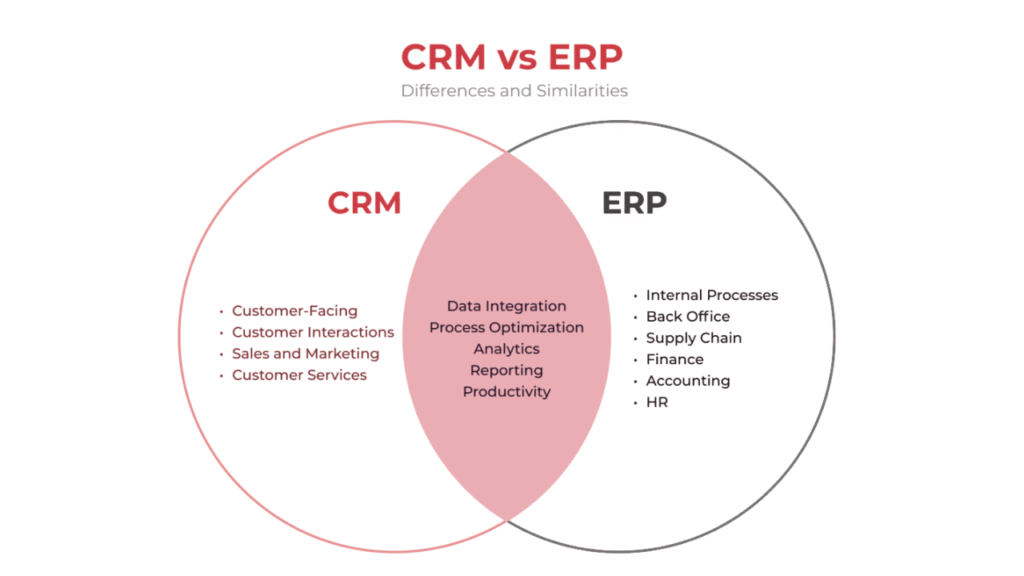
ERP and CRM are both systems used to unify your data and streamline and automate workflows. However, the domains they work in are different.
Enterprise Resource Management, or ERP, is for the back office, including inventory, production, HR, and finance, while Customer Resource Management or CRM, is all related to customers, marketing and sales, hence a front office tool.
If you want to have a deeper look at these two systems and how they contribute to a business’s growth and success, take a look at:
How to use CRM in your business to grow & win more customers
How ERP helps businesses regain control & scale efficiently
Why integrate ERP and CRM?
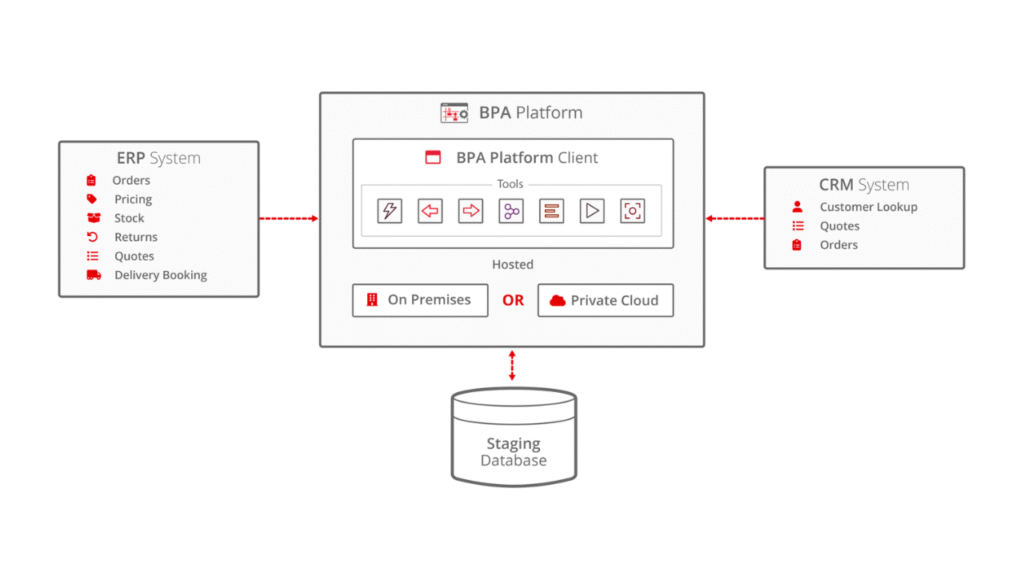
If you use ERP, you know it’s an all-in-one tool for the back office. Its goal is to replace individual tools and bring everything under one roof because it’s more efficient and systematic. If your ERP and CRM aren’t integrated, you’re still using multiple platforms and do not have a unified management system.
Benefits of Integrating ERP and CRM
When both systems are integrated, they share real-time data, reduce repetitive data entry, and free your team from a bunch of admin-related emails. Here are the major benefits of ERP and CRM integration:
- Improved team collaboration: Everyone works from the same data, reducing miscommunication and back-and-forth emails across departments.
- Faster order processing: Marketing, sales, operations, and finance stay in sync.
- Accurate forecasting: Real-time data gives better revenue and inventory predictions.
- Enhanced customer experience: Orders, payments, and support stay smooth and transparent.
- Reduced errors and duplication: Manual data entry is minimised, saving time and costs.
- Better decision-making: Leadership sees a single version of the truth.
Example cases: What happens when ERP and CRM are not connected?
Sales oversells because stock isn’t updated
Your sales and marketing team works inside a CRM, while inventory, purchasing, and finance run inside an ERP, but the systems aren’t connected.
You run a marketing campaign that drives heavy demand for a new product. Marketing sees strong customer interest in the CRM and confidently pushes promotions. Sales start to come in, but the ERP shows only 15 units are left in stock while the product is still live on the site, bringing in more sales.
Now you either have to pay extra to procure the products urgently or make the customers wait, which will dent your brand image. As a result, your customer support gets flooded, and finance deals with cash flow distortions. A successful marketing campaign turns into a borderline crisis situation for your business.
Now, if these systems were connected, this chaos would never have erupted. The ERP would have sent an alert to the CRM to stop the promotions. Or, if you had automated workflows set up, the system would have automatically flagged the product as out of stock on the website as soon as the last piece was sold.
Manual data update delays
Let’s say a sales rep changes the customer’s address in the CRM. Since your systems aren’t integrated, they email someone from the operations department to make an entry in the ERP. The person will see the email, then update the address in the system. That’s inefficient.
And guess what? If the customer’s order is dispatched to the old address before operations sees the email, you get a returned package and a delayed order.
However, by integrating your ERP and CRM, the address would be automatically updated everywhere as soon as it is changed.
Also read: 7 Practical ways to better use AI in CRM [ CTO’s guide]
How to integrate CRM with ERP
As you’re now aware of why, let’s look at how to integrate your ERP with CRM in 5 simple steps.
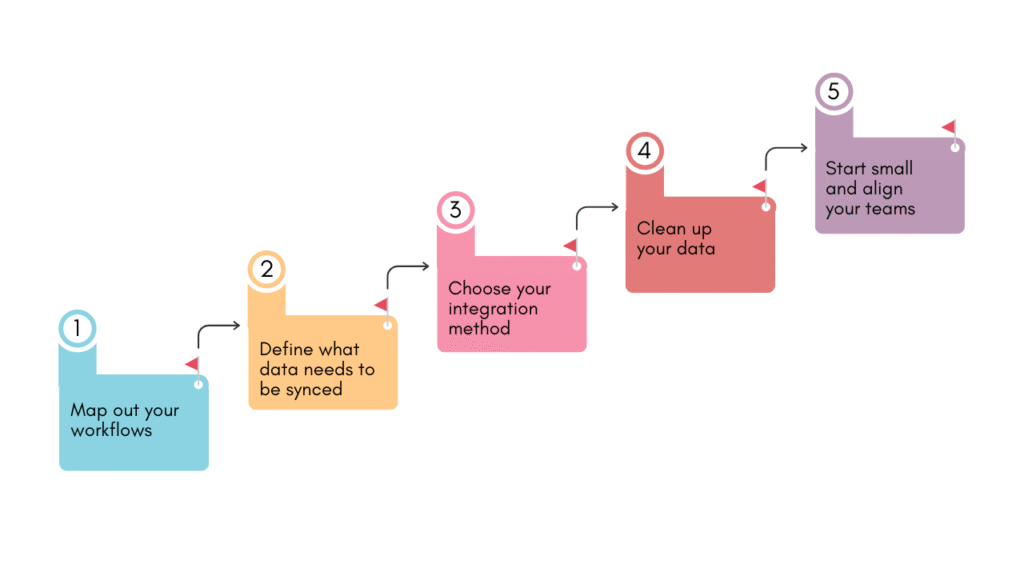
1. Map out your workflows
Before you run to your tech team, you need to do some homework to make this integration actually useful.
Map how work actually moves through your business. Document what happens when a deal closes, who touches the order next, where approvals slow things down, and where data gets re-entered. Identify friction points and revenue risks.
Get representatives from all departments; they are the ones who do the drill daily, so they understand exactly how work flows and where the real bottlenecks slow things down.
At step one, you’re mapping out your workflows, identifying the bottlenecks and defining what should happen automatically.
2. Define what data needs to be synced
To make this integration effective, we need to be strategic.
Start by listing the moments where teams depend on each other’s data, for instance, deal closure, order creation, invoicing, inventory checks, and payment confirmation. For each step, define the exact fields required. It depends on your process, but here are a few examples:
- customer name
- billing details
- product SKUs
- pricing
- tax rules
- delivery address
- payment status
Clarify the direction, too. Should data move one way or bidirectionally? Assign data ownership to prevent conflicts. Finally, remove redundant or outdated fields from both systems before integration. This ensures the right data flows at the right time to prevent delays, errors, and misalignment.
3. Choose your integration method
Now comes the technical part. There are three main ways to connect your ERP with CRM.
Native integration: Both your ERP and CRM systems come from the same vendor and already speak the same language, a.k.a are compatible with each other. This allows easy setup with minimal IT work. If your CRM and ERP are from the same vendor, then you’ve got it easy.
API-based integration: API means Application Programming Interface. In this method, you use the API as a middleman. Your systems talk to each other through code interfaces (APIs). You may need a developer to set it up.
iPaaS tools: iPaaS means Integration Platform as a Service. You can tell by the name that here you’ll use a separate tool for integration. This tool allows your ERP and CRM to communicate with each other. Think of it as a bridge platform connecting your systems.
4. Clean up your data
If one or both of your systems are cluttered with outdated information, syncing them will multiply the problem. You will end up with a unified messy database with outdated fields, inactive customers and duplicates.
Before integrating your systems, clean up the mess. Remove duplicates, standardise naming conventions, update outdated customer info, and verify product SKUs and pricing.
5. Start small and align your teams
To make the integration process smooth and error-free, start small. Don’t integrate everything at once. Begin with one critical workflow and test it thoroughly.
At the same time, involve all relevant teams: sales, marketing, operations, finance, and IT. Agree on data ownership, process rules, and escalation steps.
Wrapping it up
Integrating your ERP and CRM can feel like a big tech project, but it starts with clarity on why you want this integration and what benefits you are looking to have from it. And at some point, all businesses need integrated systems to operate smoothly.
Define the outcomes first (faster order processing, better visibility, fewer errors), then build the integration around those goals.




![How to use AI in spend analytics? [5 use cases]](https://feriotti.com/wp-content/uploads/2026/04/1-3.png)