![4 steps to start AI for operational efficiency [+Examples]](https://feriotti.com/wp-content/uploads/2026/03/1-4-1024x576.png)
AI for operational efficiency is exactly what it sounds like. It’s using AI in your day-to-day operations to automate, analyse, and sort through the data so your business runs faster and smarter without the extra overhead.
Under this AI umbrella, we have Machine Learning, NLP (Natural Language Processing) and generative AI. You don’t use all of them at once. It depends on your use case.
In this article, I will share examples of artificial intelligence in operations management and how you can integrate AI in your day-to-day operations in four simple steps that ensure you’re solving actual bottlenecks and not just adding another fancy tool to your stack that employees rarely use.
Examples of artificial intelligence in operations management
This section will show you AI’s role in operational efficiency in action. Let’s take this vague fancy idea and put it into perspective.
Example #1: Cash flow
Ask any SME owner what keeps them up at night, and cash flow is usually in the top three. Not because the business isn’t making money, but because the visibility just isn’t there. You’re waiting on three invoices, you’ve got payroll coming up, and you’re doing mental math at midnight trying to figure out if you’re okay.
AI can help. You can connect AI tools to your accounting software to give you a real-time picture of where your cash is, where it’s going, and where it’s heading.
It flags invoices likely to be paid late based on the client’s history. It automates payment reminders so you’re not chasing people manually. It also catches anomalies in your transactions before they become a problem.
Example #2: Customer service
We all want clear and direct responses instantly, thanks to AI and social media for killing our attention span and patience. The same is with the customers. They want fast responses, even if it’s one in the morning.
One option is to have a 24/7 customer service, which is heck of a lot expensive and not feasible for SMEs. But we’re living in the era of AI, and you can let artificial intelligence handle this problem.
A huge chunk of the messages your team handles every day are the same questions on repeat. “Where’s my order?” “
Can I get a refund?”
“What are your hours?”
You can use chatbots, automated email responses and smart ticket routing to reduce the load on your customer support team while seamlessly answering your customers’ questions. Your response time drops. Your team focuses on inquiries that actually need a human, and your customers feel like they’re being looked after, even at one in the morning.
Example #3: Inventory and supply chain
“Last year we sold X, so let’s order X plus a bit more.”
If this is how you order, you’ve either already faced the following situations or you will soon.
- Cash is collecting dust on a shelf because you over-ordered.
- Or out of your best-seller mid-peak season, because nobody saw it coming.
AI and predictive analysis can help you foresee demand and tell you exactly what to order and when. It factors in your sales history, seasonality, supplier lead times, and even external trends to build an accurate picture of future demand.
Example #4: Data entry
Data entry is one of the most mind-numbing, error-prone tasks. It’s repetitive and shouldn’t need a human in the age of AI.
You can automate your data entries and sync them across your systems to make everything coherent without any manual intervention. I have a dedicated article on data entry problems and how you can solve them with automation; you can check it out. It shows how you can use AI to automate the entry of unstructured, raw data, like customer reviews and email threads, along with paper and digital documents.
Example #5: People and scheduling
If you’re in retail, hospitality, clinics, warehouses or any area where your staff works in shifts, you know how much time goes into building a roster. And maintaining it is an even bigger task. You perfectly place everyone in every day of the week, and someone calls in sick and boom, your sand castle falls apart.
AI scheduling tools look at your historical footfall, booking patterns, and demand data to build rosters that match your real needs. When someone drops out at the last minute, the system suggests who to call based on availability and hours already worked.
It’s a win-win for everyone. Your staff get fairer, more predictable schedules, and you’re not scrolling through your contacts hoping someone picks up.
Example #6: Production
If your business makes, assembles, or packages anything physical, this one’s for you.
Manual quality checks are slow, inconsistent, and expensive, with an always-present risk of error. AI-powered computer vision tools inspect products in real time, on the line, at a speed and consistency no human team can match. They flag defects, packaging errors, and inconsistencies the moment they happen.
If you’re at an earlier stage, cloud vision APIs from Google or Microsoft are an accessible starting point.
If you want to see how these example workflows and processes are built and what tools are used, have a look at 6 quick & practical AI workflow automation examples
How to integrate AI for operational efficiency
You have seen examples and the benefits AI brings to your operations. Now the main question is: how do you start? Let’s see
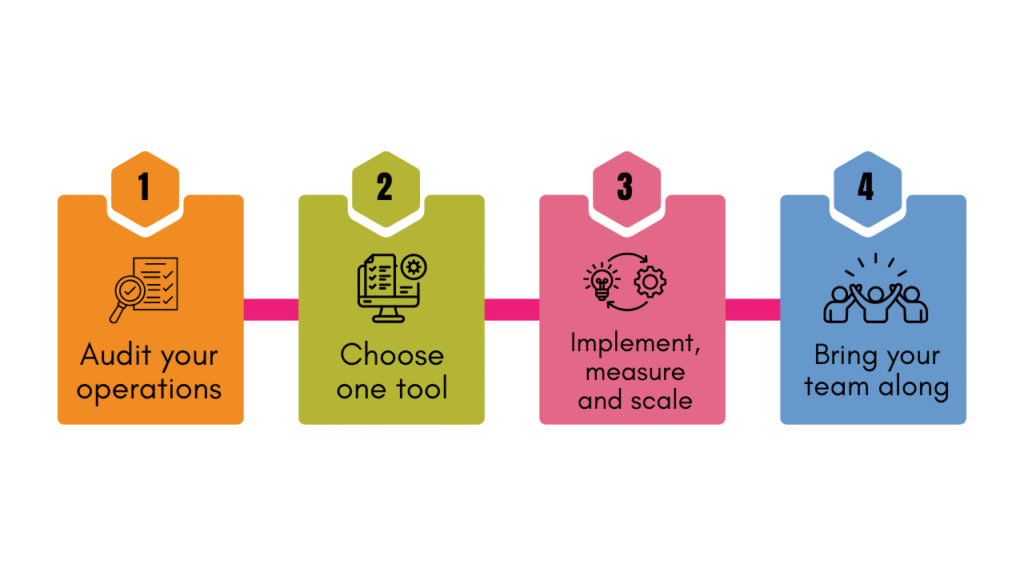
1. Audit first
Before you start exploring tools, look at your operations.
- Where is time consistently being wasted?
- What process breaks down every week?
- What’s the one thing your team dreads because it’s tedious, repetitive, and eats hours?
That’s your starting point. That’s the main problem that your business needs solving, not what someone on the internet is telling you.
2. Choose one tool
A business that implements one AI tool well is miles ahead of one that half-implements five. And trust me, the second situation is more common than you think it is, so resist the urge to overhaul everything at once. Pick the one area that came up in your audit and find a tool that specifically solves that problem. There are different tools for different use cases, so be specific in your search; otherwise, you’ll be overwhelmed with the countless options the internet will present to you.
3. Implement, measure and scale
Implement the tool and workflow. There are multiple low to no-code tools available. Your tech or IT team can easily set them up.
Have a simple baseline before you start. How long does the process take now? What does it cost? How many errors occur?
Run the tool for 60 to 90 days and compare. If it’s working, great, now you have proof, and you can scale it or move to the next use case. If it’s not, you’ve only risked one process, which is easy to undo.
4. Bring your team along
You can pick the perfect tool, and it can still fail because your team either doesn’t trust it or understand it, or quietly works around it.
Involve your teams at every step. Explain what the tool does and what it doesn’t do. It’s not replacing anyone. It’s taking the annoying, repetitive work off their plate so they can focus on the stuff that actually needs them. It’s important that they feel comfortable with the tools, AI and automation.
Also read: 7 practical ways to better use AI in CRM [CTO’s guide]
So, when are you starting?
Your competitors are either already using AI or they’re about to. Meanwhile, you’re still manually updating a spreadsheet at 9 pm on a Tuesday. Just saying.
The SMEs that are using AI for operational efficiency won’t just be faster. They’ll be harder to compete with. The gap between those who adopt and those who don’t is already opening up. Which side are you on?




![How to use AI in spend analytics? [5 use cases]](https://feriotti.com/wp-content/uploads/2026/04/1-3.png)